
 October 26, 2011
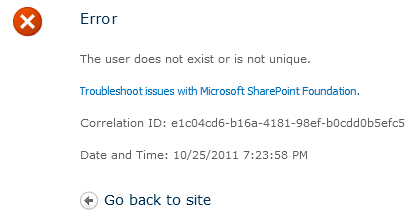
If you are seeing the error message above, chances are you set an incorrect value or values configuring the object cache user accounts for one of your web applications.
If you want to reset them back to their default values you can run the following STSADM commands or use the PowerShell script below.
Note: %1 should be the URL of your Web Application:
stsadm -o setproperty -propertyname portalsuperreaderaccount -propertyvalue "NT Authority\Local Service" -url %1
stsadm -o setproperty -propertyname portalsuperuseraccount -propertyvalue SHAREPOINT\system -url %1
Before you set the accounts using PowerShell or STSADM you must first grant them access to each Web Application. This is done via Central Administration | Application Management | Manage web applications | User Policy (for each web application).
The domain account for the Portal Super Reader should be granted Full Read – Has full read-only access
The domain account for the Portal Super User should be granted Full Control – Has full control
Here is the contents of the PowerShell script I used to set the values for each of the Web Applications
param([string]$superuser = "superuser", [string]$superreader = "superreader", [string]$url="url")
$wa = Get-SPWebApplication -Identity $url
$wa.Properties["portalsuperuseraccount"] = $superuser
$wa.Properties["portalsuperreaderaccount"] = $superreader
$wa.Update()
When you are finished updating your web applications you must reset IIS on each of your Web Front Ends.
iisreset /noforce
All these steps are documented in the following TechNet article titled Configure object cache user accounts.


 Azure DevOps and Visual Studio Awesomeness
Trackbacks/Pingbacks
[…] This is a very generic error message but I was able to find the explanation on how to solve it on the post "SharePoint 2010: The user does not exist or is not unique". […]
LikeLike