
 May 26, 2011
Log Name: Application
Source: Microsoft-SharePoint Products-SharePoint Server
Date: 5/25/2011 2:54:04 AM
Event ID: 8088
Task Category: Taxonomy
Level: Warning
Keywords:
User: DEV\_ap_pool
Computer: WFE-01.DEV.LOCAL
Description:
The Managed Metadata Service ‘<Service Name>’ is inaccessible.
If you are receiving this error on your SharePoint Servers the fix is quite easy. There is also a TechNet link that deals with the common causes and suggests the following resolution.
Verify the application pool account permissions that have been granted (or not) to the Managed Metadata Service Application.
Launch Central Administration and Click Manage service applications (under Application Management)
Select the Managed Metadata Service and click Permissions to view/edit the Connection Permissions for Managed Metadata Service
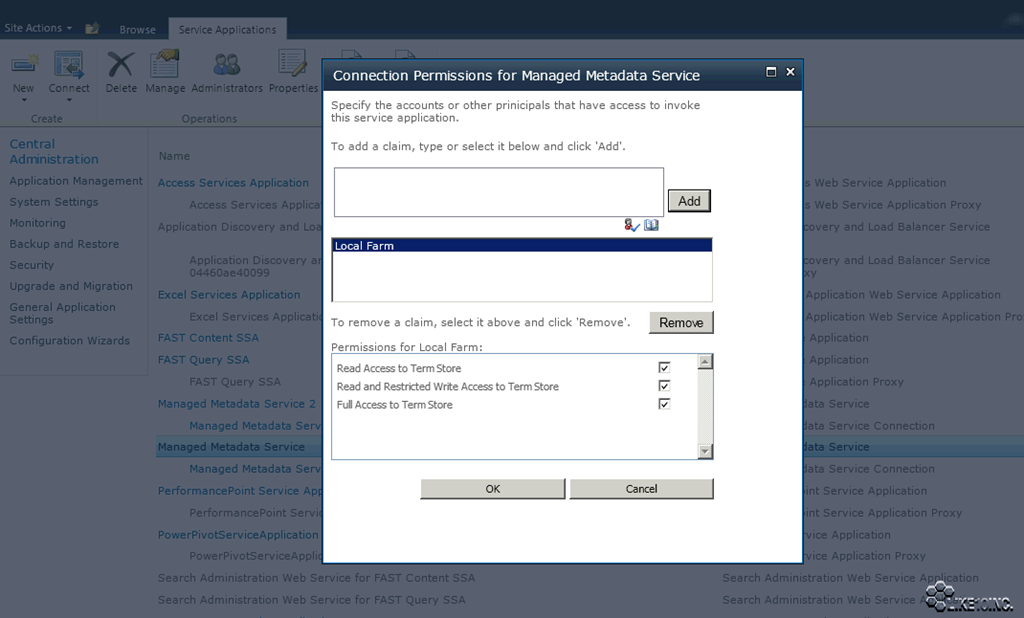
Verify the application pools have been granted the following Permissions:
- Read Access to Term Store
- Read and Restricted Write Access to Term Store
- Full Access to Term Store


 Azure DevOps and Visual Studio Awesomeness
When you check the permissions, as your screen-shot shows, it displays ‘Local Farm’. Do you have to manually add the Service Application account and check that the 3 boxes are checked? Or do you only need the 3 boxes checked for ‘Local Farm’ (as your screen-shot depicts) and that is enough?
LikeLike
You would add the domain account being used for the Application Pool and grant the following permissions:
Read Access to Term Store
Read and Restricted Write Access to Term Store
Full Access to Term Store
In my post above I would grant those permissions to the DEV\_ap_pool account (make sure you click Add). I should have posted a screenshot of the actual change 😦
LikeLike
Many thanks for your prompt reply Wes!
LikeLike